

Introduction:
Modern digital platforms rely heavily on intelligent search to deliver precise results instantly. Traditional keyword-based search systems, however, often fail to grasp the meaning behind a user’s query. For example, a user searching for “budget-friendly noise-cancelling earbuds” may receive unrelated premium listings because the engine matches keywords rather than context.
The fundamental limitation lies in literal keyword matching. Tools such as Elasticsearch are optimized for speed and index-based retrieval but not for understanding semantic intent. As user expectations evolve, organizations increasingly require search solutions capable of interpreting meaning, relevance, and intent rather than mere text overlap.
Integrating Elasticsearch for fast data retrieval with ML.NET for semantic re-ranking within .NET 8 offers a robust hybrid approach. This combination achieves both speed and contextual intelligence. Such systems are ideal for e-commerce, enterprise search, and knowledge-base applications where meaningful ranking significantly improves user satisfaction.
At Payoda, we help enterprises design and implement intelligent, intent-aware search architectures that blend high-performance retrieval with AI-driven relevance.
Objective:
Develop a performant, intent-aware search API using Elastic and ML.NET on .NET 8 to rank results by semantic relevance rather than only textual similarity.
1. The Problem with Traditional Search
| Aspect | Traditional Search (Keyword-Based) | Modern Intelligent Search (AI-Driven) |
|---|---|---|
Matching | Matching
Literal keyword overlap | Semantic understanding and context |
Relevance | Static score-based ranking | ML-driven dynamic re-ranking |
Adaptability | Limited synonym handling | Learns relationships (e.g., “cheap” ≈ “affordable”) |
Example | “cheap headset” → May show expensive products containing same keywords | “cheap headset” → Accurately retrieves affordable, noise-cancelling models |
Key Limitations:
- Inability to recognize synonyms or conceptually related expressions.
- Lack of intent comprehension or contextual interpretation.
- Returns technically correct but semantically irrelevant outcomes.
Solution: Introduce an ML-based re-ranking process that scores retrieved documents by meaning rather than literal word overlap.
2. The Hybrid Approach: Elastic + ML.NET + .NET 8
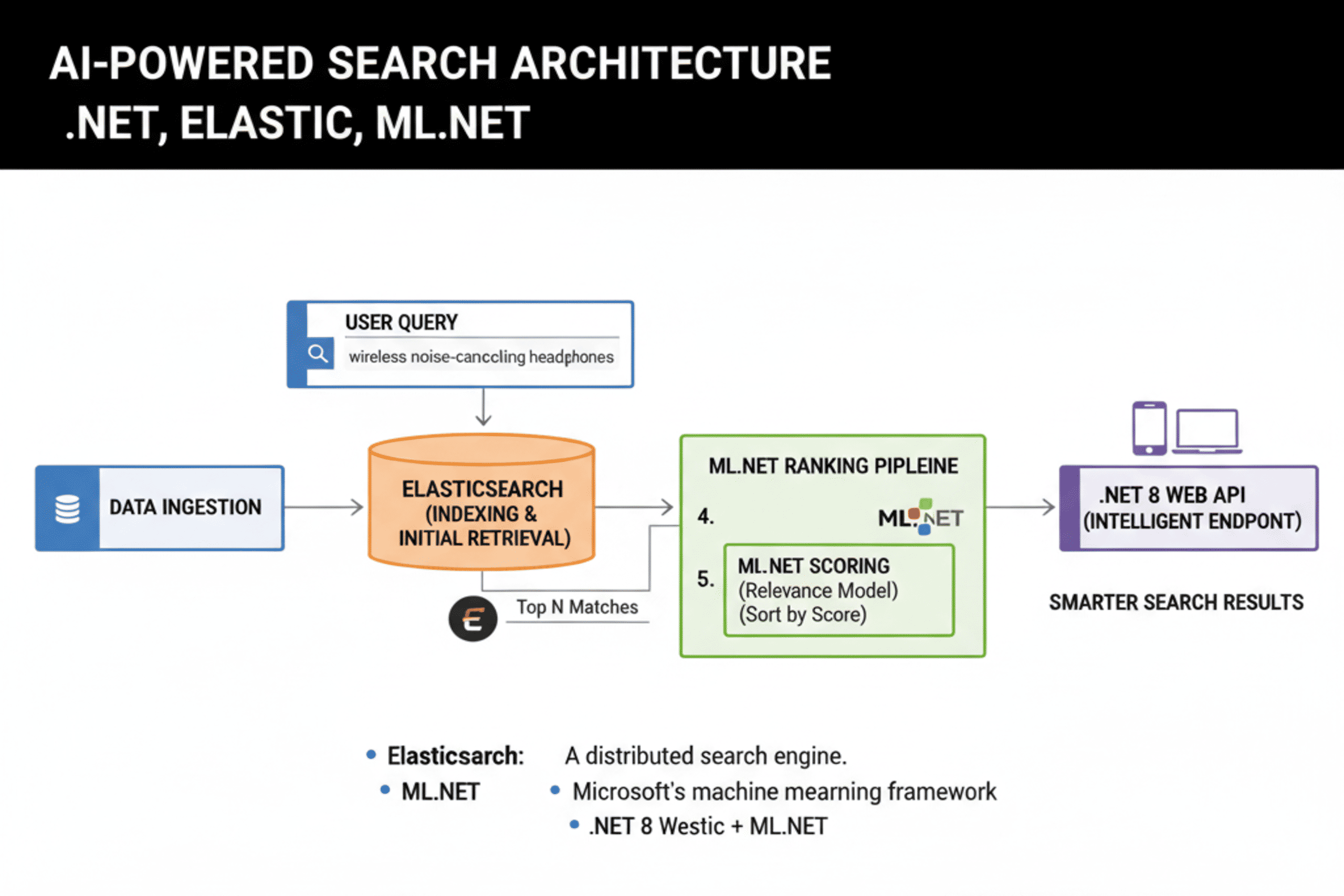
This architecture blends three distinct but complementary components, forming an efficient semantic search pipeline.
| Component | Role | Function |
|---|---|---|
Elasticsearch | Retriever | Rapidly fetches the top N keyword-matched documents |
ML.NET | Re-Ranker | Uses a trained model to assess contextual relevance |
.NET 8 API | Orchestrator | Integrates both systems and exposes results to clients |
Workflow Summary:
- The user submits a query.
- Elasticsearch retrieves the top N potential matches.
- ML.NET evaluates each candidate’s semantic alignment with the query.
- The results are reordered and returned through a .NET API endpoint.
Outcome: A search experience that remains fast while significantly improving contextual accuracy, aligning output with how humans phrase and interpret information.
3. Step-by-Step Implementation
Step 1 – Environment Setup
Prerequisites:
- Install the .NET 8 SDK.
- Run Elasticsearch 8.x locally or in Docker.
- Add required NuGet dependencies:
dotnet add package Nest
dotnet add package Microsoft.ML
dotnet add package Microsoft.ML.Transforms.Text
Step 2 – Define the Data Model
A basic Product model represents each searchable record.
public class Product
{
public string Id { get; set; }
public string Name { get; set; }
public string Description { get; set; }
}
Each Product entry is indexed in Elasticsearch and also utilized for ML model training and evaluation.
Step 3 – Connect to Elasticsearch
Use the NEST client to establish a connection and index sample data.
var settings = new ConnectionSettings(new
Uri(“http://localhost:9200”)).DefaultIndex(“products“);
var client = new ElasticClient(settings);
// Index sample items
client.IndexDocument(new Product
{
Id = “1”,
Name = “Wireless Headphones”,
Description = “Bluetooth headset with active noise cancellation”
});
At this stage, keyword-based searches work, but results remain literal rather than contextual.
Step 4 – Train a Semantic Relevance Model with ML.NET
The goal is to train a model that can measure whether a document is contextually relevant to a given query.
| Query | Description | Label |
|---|---|---|
“noise cancelling headphones” | “Bluetooth noise cancelling headset” | 1 |
“gaming mouse” | “Wireless headset with bass boost” | 0 |
Training Pipeline in C#:
var ml = new MLContext();
var data = ml.Data.LoadFromEnumerable(trainingSamples);
var pipeline = ml.Transforms.Text.FeaturizeText(“QueryFeats”, “Query”)
.Append(ml.Transforms.Text.FeaturizeText(“DescFeats”, “Description”))
.Append(ml.Transforms.Concatenate(“Features”, “QueryFeats”, “DescFeats”))
.Append(ml.BinaryClassification.Trainers.SdcaLogisticRegression());
var model = pipeline.Fit(data);
ml.Model.Save(model, data.Schema, “relevanceModel.zip”);
The model converts text into numerical vectors and learns which patterns indicate strong semantic alignment between a user’s query and a product’s description.
Step 5 – Integrate ML Scoring with Elasticsearch Results
After training, integrate ML predictions into the search workflow:
var mlContext = new MLContext();
var model = mlContext.Model.Load(“relevanceModel.zip”, out _);
var predictor = mlContext.Model.CreatePredictionEngine<SearchInput, SearchOutput>(model);
var elasticResults = client.Search<Product>(s => s
.Query(q => q.Match(m => m.Field(f => f.Description)
.Query(“noise cancelling headphones”))));
var ranked = elasticResults.Documents .Select(doc => new
{
Product = doc,
Score = predictor.Predict(new SearchInput
{
Query = “noise cancelling headphones”,
Description = doc.Description
}).Score
}).OrderByDescending(r => r.Score).ToList();
Process Summary:
- Elasticsearch retrieves candidate results.
- The ML model computes contextual relevance.
- Results are re-ranked by the predicted semantic score.
This functionality can be encapsulated within an API endpoint, allowing web or mobile frontends to query seamlessly.
4. Real-World Applications
| Industry | Example Query | Expected Intelligent Result |
|---|---|---|
E-Commerce | “eco-friendly shoes” | “sustainable sneakers” |
Knowledge Base | “reset login” | “password recovery instructions” |
Enterprise Search | “Q1 budget report” | “financial summary Q1.xlsx” |
Media/Streaming | “uplifting movies about friendship” | Titles matching emotional and contextual tone |
By layering semantic interpretation over keyword retrieval, the system produces outputs that match user intent rather than relying on text overlap.
5. Comparison: Traditional vs AI-Enhanced Search
| Feature | Elasticsearch Only | Elastic + ML.NET Hybrid |
|---|---|---|
Speed | Extremely fast | Slightly slower (ML step added) |
Relevance | Keyword similarity | Context-aware ranking |
Ranking | Fixed scoring | Adaptive, model-driven |
Maintenance | Minimal | Moderate (requires retraining) |
User Satisfaction | Moderate | High – intent-driven relevance |
6. Extending the Architecture
Further improvements can enhance scalability and personalization:
- Semantic Embeddings: Incorporate pre-trained sentence-transformer or ONNX models in ML.NET for richer language understanding.
- Personalized Ranking: Add user-specific attributes (preferences, past behavior) as input features.
- Hybrid Scoring Formula: FinalScore=(ElasticScore×0.6)+(MLScore×0.4)FinalScore = (ElasticScore \times 0.6) + (MLScore \times 0.4)FinalScore=(ElasticScore×0.6)+(MLScore×0.4)
- Continuous Learning: Periodically retrain the ML model using click-through or conversion data.
- Caching Mechanisms: Cache frequently executed queries to minimize latency and server load.
7. Testing and Validation
Performance Indicators:
- Precision / Recall: Measure accuracy of retrieved vs relevant results.
- F1 Score: Balances precision and recall.
- Click-Through Rate (CTR): Validates model effectiveness with live user behavior.
Validation Process:
- Begin with a labeled dataset of query–document pairs.
- Expand incrementally as user feedback accumulates.
- Conduct A/B testing to measure user satisfaction improvements compared to baseline keyword-only search.
8. Common Challenges and Recommended Practices
| Challenge | Cause | Mitigation |
|---|---|---|
Model Latency | Model reloaded per request | Load once at startup and reuse |
Data Gaps | Poorly labeled or inconsistent samples | Expand and refine the dataset |
Scaling Constraints | Too many real-time predictions | Employ batch scoring and caching |
Maintaining data quality and efficient deployment are essential to achieving high throughput and consistent ranking quality.
Conclusion
Search capabilities are advancing rapidly from literal keyword lookup to true semantic comprehension. By integrating Elasticsearch’s retrieval efficiency with ML.NET’s contextual reasoning inside .NET 8, developers can design intelligent search systems that deliver results aligned with human expectations.
This architecture offers scalability, modularity, and precision while requiring minimal changes to existing infrastructure. The hybrid design effectively turns a traditional search index into a context-aware assistant capable of understanding what users mean, not merely what they type.
For businesses, this improvement translates to enhanced engagement, higher conversion rates, and a better overall user experience. By adding an ML-based semantic layer, teams can modernize their search infrastructure without replacing core Elastic functionality.
At Payoda, we help organizations architect and implement AI-enhanced search solutions that combine performance, relevance, and enterprise scalability.
Key Insight: Combining Elasticsearch’s speed, ML.NET’s learning capability, and .NET 8’s flexibility provides a foundation for building high-performance search solutions that interpret and respond intelligently to user intent.
FAQ'S
- Can pre-trained models be used instead of custom training?
Yes. ML.NET supports ONNX and TensorFlow models. Incorporating pre-trained embeddings typically enhances performance on linguistically complex data.
- How can large-scale performance be maintained?
Use Elasticsearch for indexing and retrieval, employ asynchronous inference or batch scoring for ML.NET predictions, and cache frequent queries to minimize response time.
- Is the approach limited to text data only?
Primarily, yes. However, ML.NET supports multimodal inputs, allowing integration of image or structured metadata if trained accordingly.
Talk to our solutions expert today.
Our digital world changes every day, every minute, and every second - stay updated.