
Introduction:
In Payoda, we recognize that a Flutter application is more than just a collection of widgets; it is a guest within a complex mobile operating system. A common pain point for developers is the “Native Wall”—the moment a test fails because it cannot interact with a system permission dialog, a camera prompt, or a push notification. Historically, Flutter’s integration_test package has been confined to the “sandbox,” unable to reach outside the app’s process. This creates a significant blind spot in Quality Assurance, leading to manual testing overhead and potential production bugs in critical user journeys like onboarding or biometric authentication. At Payoda, we address this by leveraging Patrol—an open-source framework that grants Flutter tests “superpowers” to control the entire device. This guide outlines our approach to achieving 100% E2E test coverage, ensuring that your app performs flawlessly from the widget tree to the OS level.
The Architecture: How Patrol Transcends the Sandbox
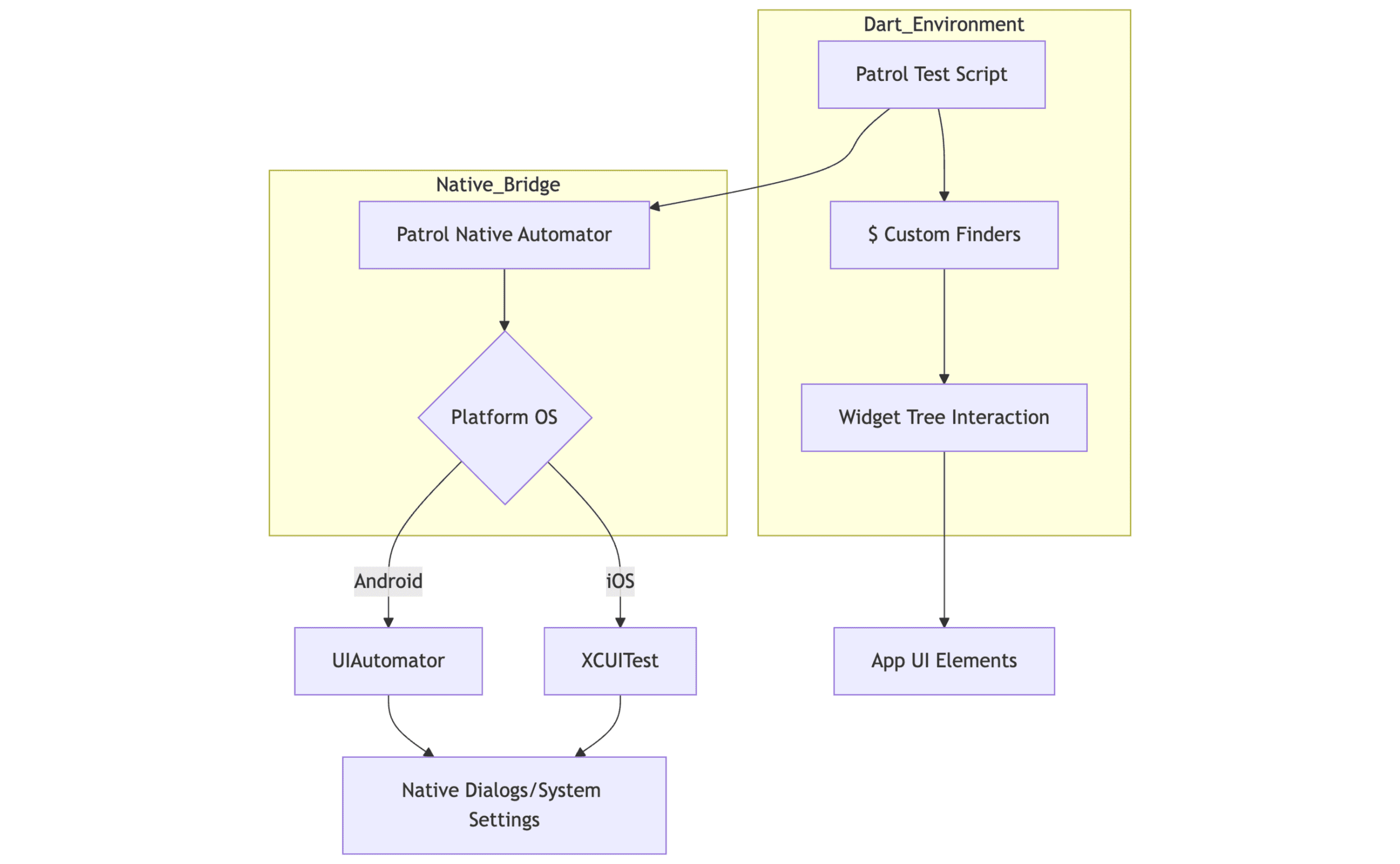
To understand the power of Flutter E2E Testing with Patrol, we must look at how Patrol orchestrates the testing environment. Unlike standard tests, Patrol operates a dual-process system that allows Dart to communicate with native layers.
Why Patrol? Key Advantages
While standard flutter integration_test is limited to the app’s internal logic, Flutter E2E Testing with Patrol provides full control over the mobile environment:
- Beyond the Sandbox: Interacts with the entire device and native system layers, not just the Flutter UI.
- Native Dialog Handling: Seamlessly manages system prompts like location, camera, and notification permissions.
- External App Flows: Supports cross-app testing, including social logins (Google/Facebook) and system settings.
- Hardware Control: Toggles system-level features like Wi-Fi, Airplane Mode, and Biometrics (FaceID/TouchID).
- Clean Syntax: Replaces verbose Finders with a “Settle-and-Find” ($) approach that handles waiting and scrolling automatically.
Detailed Concepts and Approaches
The Native Automator:
Patrol’s standout feature is the nativeAutomator. It allows you to write Dart code that interacts with elements outside of Flutter:
- System Dialogs: Automatically tap “Allow” on location, camera, or notification permissions.
- Connectivity: Toggle Wi-Fi, Cellular Data, or Airplane Mode to test “Offline Mode” logic.
- External Apps: Minimize the app, open the system Settings, and return to the app.
- Authentication: Handle native FaceID/TouchID prompts that standard tests cannot see.
Enhanced Selection Logic ($):
The standard Flutter Finder is verbose and often requires complex pumpAndSettle calls. Patrol introduces the “Settle-and-Find” approach using the $ symbol.
- Automatic Waiting: It automatically waits for widgets to appear, reducing “flaky” tests caused by loading screens.
- Concise Syntax: Instead of find.byType(Text), you use $(Text).
- Internal Logic: It combines finding, scrolling-into-view, and waiting into a single action.
Real-World Approach: The “Onboarding” Journey
To illustrate the value of Flutter E2E Testing with Patrol, consider a real-world onboarding flow:
- Step A: The app launches and triggers a system location request.
- Step B: Patrol detects the native dialog and grants permission using $.native.grantPermissionWhenInUse().
- Step C: The app moves to the home screen; Patrol verifies the UI state.
- Step D: A push notification is simulated; Patrol opens the notification tray to verify the message details.
Integration Workflow: Step-by-Step Implementation
| Step | Action Item | Technical Detail |
|---|---|---|
1 | CLI Installation | Run flutter pub global activate patrol_cli to manage device orchestration. |
2 | Project Setup | Initialize Patrol in your project using patrol init to generate native test targets. |
3 | Dependency Config | Add patrol to dev_dependencies and configure testInstrumentationRunner in Gradle. |
4 | Test Writing | Utilize patrolTest() to wrap the widget and native interactions in one block. |
5 | Execution | Run patrol test --target integration_test/app_test.dart to launch on a device. |
Detailed Native Interaction Example
In a standard test, clicking a “Download” button that triggers a system “Allow File Access” prompt would hang the test indefinitely. With Flutter E2E Testing with Patrol, the workflow is seamless:
patrolTest(‘File Download Flow’, ($) async {
await $.pumpWidgetAndSettle(const MyApp());
// Trigger the native prompt
await $(‘Download PDF’).tap();
// Step outside Flutter to handle the OS dialog
await $.native.grantPermissionOnlyThisTime();
// Return to Flutter to verify success
expect($(‘Download Complete’), findsOneWidget);
});
Why Payoda is Your Partner in Technical Excellence
Implementing native E2E testing is technically demanding, requiring deep knowledge of both Flutter and native platform runners (Gradle and CocoaPods).
- Payoda’s Expertise: We specialize in setting up resilient automation frameworks that eliminate manual QA bottlenecks and handle the intricacies of native OS interactions.
- One-Liner Value Proposition: Payoda can solve your native testing challenges by implementing robust, automated, and scalable Patrol-based frameworks.
- The Result: Faster release cycles, zero regression in native features, and a superior user experience.
Conclusion
As Flutter continues to dominate the cross-platform market, the complexity of the apps built with it grows. We can no longer afford to ignore the native components that surround our widgets. By integrating Flutter E2E Testing with Patrol, Payoda ensures that every facet of an application—from a simple button click to a complex biometric login—is validated in a real-world environment. This approach not only saves hundreds of hours in manual testing but also builds a foundation of trust with the end user. Embracing these advanced testing workflows is not just a best practice; it is a prerequisite for high-scale, enterprise-grade mobile development.
FAQs
- Does Patrol support testing for third-party social logins like Google or Facebook?
Yes. This is one of Patrol's primary strengths. Since those login flows often take the user out of the Flutter app and into a web browser or a native system view, Patrol can use its native selectors to identify the "Sign In" buttons and text fields that are invisible to standard Flutter integration tests.
- Can I use Patrol to test interaction with other installed apps?
Absolutely. Patrol is not limited to your own app's process. You can write scripts that minimize your app, open a browser or the Maps app, perform an action, and then use the native "Recents" or "Home" command to navigate back to your Flutter application, verifying that the state remains intact.
Talk to our solutions expert today.
Our digital world changes every day, every minute, and every second - stay updated.